AI customer service, calendar, restaurant, shop, quotes and guest reception with Cabibee. Connected operations with a professional website, payments and follow-up on web and app.
Business tools
What each tool does.
A conversation can lead to an appointment, order or reservation. Choose a tool to see its full workflow, not just its name.
A reception desk that checks your real availability.
AI answers service and schedule questions, checks open slots and helps customers book. You define who provides each service, its duration and your calendar rules.
Services with prices, duration and images.
Specialists or resources, schedules, breaks and availability.
Day, week and upcoming appointment views for your team.
A microsite where customers browse services and book.
Appointment lookup and cancellation under business policies; deposits with Payments enabled.
AI checks the calendar before offering a time; it does not confirm slots the tool has not granted.
Enable what each business needs. Some tools require separate agents: restaurant, shop and Cabibee do not mix within a single agent; payments depend on the workflow and enabled methods.
Inside the product
Your operations, on web and app.
BeeAgent responds with your business information and connects conversations to your tools. Configure operations on the web; follow up with your team in the app.
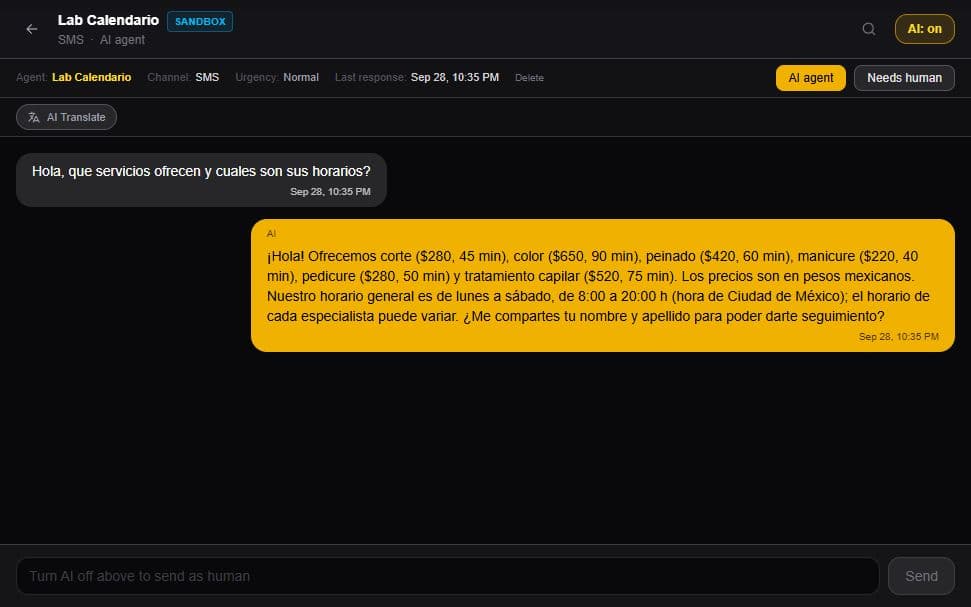
A question about services and hours, answered with the business information. Your team stays in control of the conversation.
123
Actual product screenshot. The interactive demo uses fictional data.Enlarge screenshot↗
1
Replies with your information
This example uses the salon's services, prices, durations and opening hours.
2
Your team can take over
Pause the AI for an individual conversation when a person needs to step in.
3
Translation in the chat
AI Translate lets you read messages in another language and view the original.
Conversations, orders, appointments, payment proofs and alerts in one place. Follow up on operations and handle what needs a person, away from the desk too.
✓Customer profile: history, appointments, orders and notes.
✓Payment proofs to approve or reject after review.
✓Alerts for issues that need your team's attention.
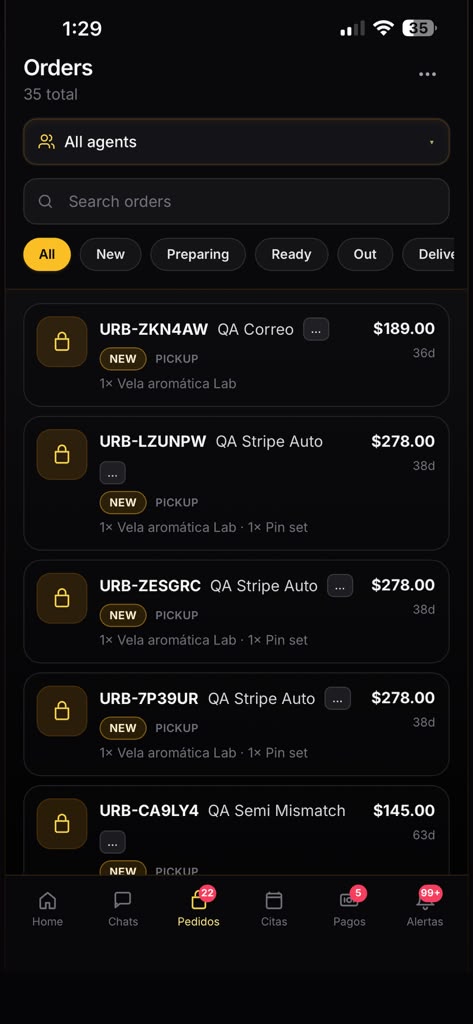
Filter orders by agent and status, review products and check the total. Your team follows up from the app.
Actual app screenshots provided by URBNBEE. English interface.
1Filter by agent
2Select order status
3Review products and total
Context, team and follow-up
Serve your customer. Understand your business.
Conversations, tools and follow-up for small businesses, with the team always in control.
A virtual agent for your business
It combines the information you provide with your replies and your customers' replies in the available history to understand the conversation and maintain continuity. You keep services, prices and policies up to date: a customer's reply does not replace business rules.
Team, profiles and CRM
Profiles bring together history, appointments, orders and notes for customer continuity. Collaborators follow cases on web and app; when a person needs to step in, pause AI for that conversation and take over.
Analytics grounded in activity
Review activity, replies, appointments, orders and escalated cases based on available data. Dashboard summaries help you understand what is happening and decide where to step in, without equating handled messages with collected revenue.
Notification center
Bring together booking, sales, quote and customer updates, plus cases that need a person. Filter by category and priority, review pending items, and mark or archive updates in the available web and app views.